
Prospects
Objective
Section titled “Objective”Centralize and organize the database of potential talent that has not yet been contacted, allowing advanced searches, market analysis, and an orderly transition to active candidates within the recruitment process in the ATS.
Key functionalities
Section titled “Key functionalities”This module allows:
- View and manage a massive database of professional profiles
- Analyze availability of talent by skills, experience, language proficiency, and country
- Identify profiles with greater compatibility with a job description through artificial intelligence
- Filter, classify and prioritize prospects before initiating contact
- Convert prospects into candidates once communication is established
- Export information for external analysis or reports
Step by step
Section titled “Step by step”1. Module access
Section titled “1. Module access”At the top of the main menu interface, after logging in with credentials, select the Prospects tab.
2. General exploration
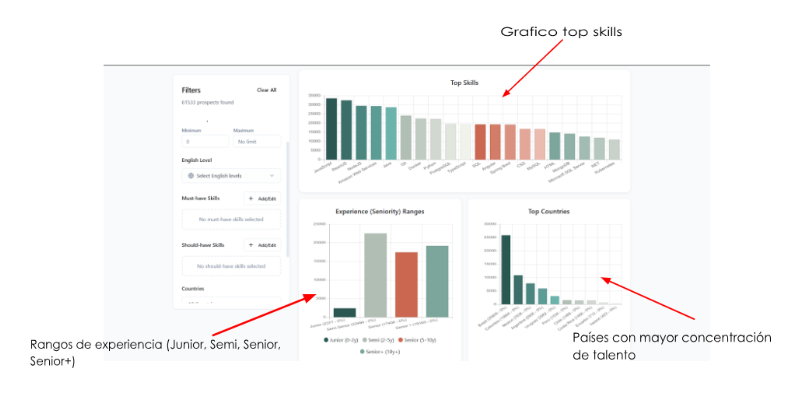
Section titled “2. General exploration”At the top, the total available prospects is displayed.
Charts are displayed with:
- Top Skills - Most common skills in the database
- Experience ranges (Junior, Semi, Senior, Senior+)
- Countries with the highest concentration of talent
3. Use of filters
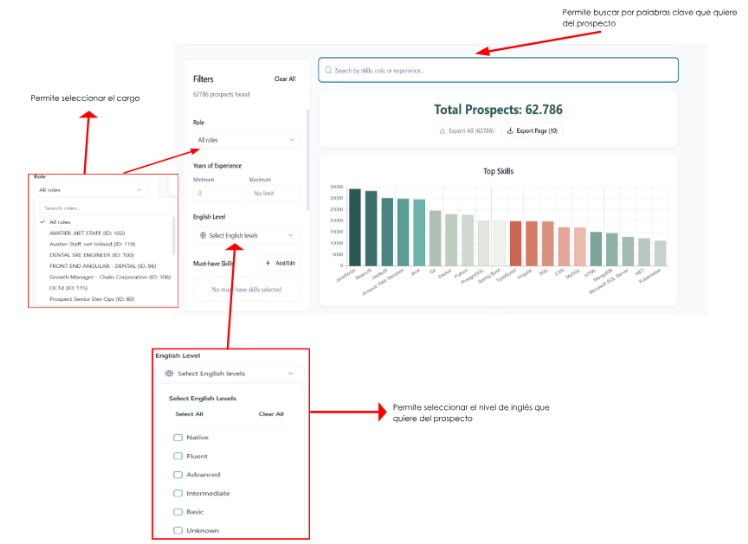
Section titled “3. Use of filters”From the left panel it is possible to optimize the search through the following filters:
Filter by years of experience
Section titled “Filter by years of experience”Allows segmenting candidates according to their seniority level (Junior, Semi-Senior, Senior, Senior+).
Filter by English level
Section titled “Filter by English level”In the English Level filter, the dropdown button presents different levels by which you can filter (Basic, Intermediate, Advanced, Native).
Filter by skills
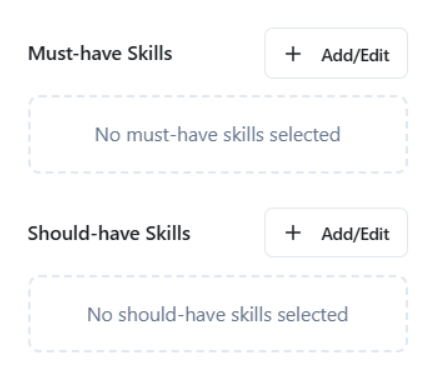
Section titled “Filter by skills”Must-have Skills (Mandatory skills):
Technical or professional skills that the prospect must have.
Should-have Skills (Desirable skills):
Additional skills that enhance the profile but are not exclusionary.
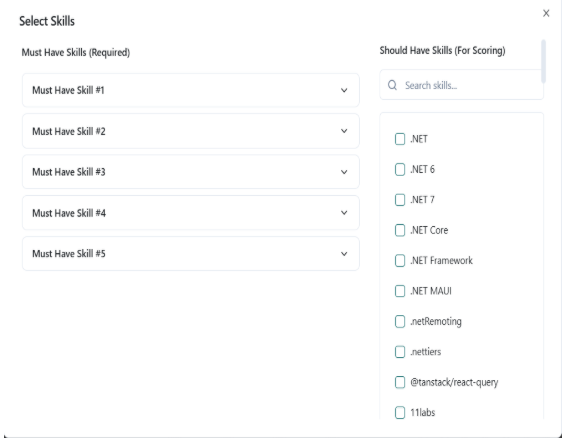
Both filters have an Add/Edit button that allows selecting these skills from a predefined catalog.
Filter by country
Section titled “Filter by country”The panel also includes search by Countries.
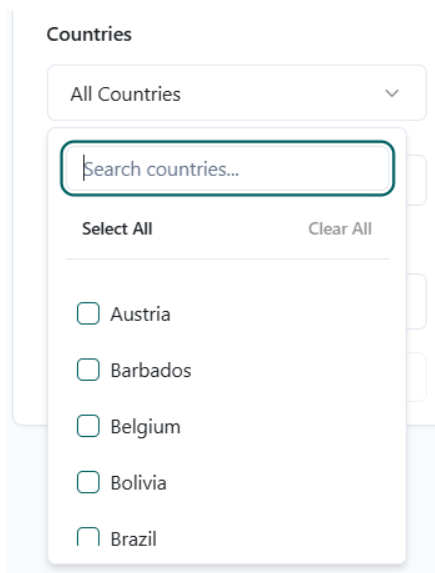
When selecting this option, the button displays a list with different available countries.
Search by keywords
Section titled “Search by keywords”At the top of the charts there is a general search bar that facilitates searching by keywords.
4. Prospect review
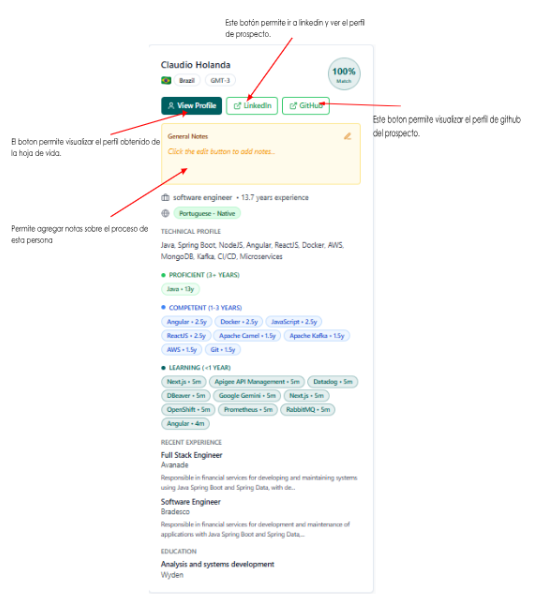
Section titled “4. Prospect review”Each prospect card displays the following information:
- Profile name
- Country and time zone
- Match percentage with the job description
- View Profile button - View complete profile
- LinkedIn button - Direct access to LinkedIn profile
- Github button - Direct access to GitHub profile
- General Notes section for internal comments
- General description of skills and experience
Operational tips
Section titled “Operational tips”- Use the charts first to understand the market before filtering
- Define well the Must-have Skills to avoid false positives
- Always review the match percentage, but validate the profile manually
- Use notes to leave context before contacting the prospect
- Export only when filters are well defined to avoid data noise
- Remember that prospects have not been contacted yet
Errors to avoid
Section titled “Errors to avoid”- Contacting prospects without properly converting them to candidates
- Using filters that are too broad that make decision-making difficult
- Confusing prospects with active candidates
- Not reviewing the English level before advancing in the process
- Exporting large volumes without a clear criterion
- Not documenting interactions or decisions in notes